Evaluating Romusen - Keynote Template for Professional Presentations
In the realm of business communication and personal storytelling, the visual quality of a presentation can significantly influence audience engagement. For users of Apple’s Keynote software, finding a balance between aesthetic appeal and functional flexibility is often a challenge. The Romusen - Keynote Template emerges as a solution designed to streamline this process. This article provides an objective evaluation of the template, exploring its features, usability, and suitability for various professional and personal needs.
Understanding the Romusen - Keynote Template
The Romusen - Keynote Template is a comprehensive design package intended to replace the default, often generic, slide layouts found in standard presentation software. It is built specifically for Keynote, leveraging the platform’s native capabilities for smooth animations and vector-based graphics. At its core, the template offers a structured foundation that allows users to input their content without starting from a blank canvas.
One of the defining characteristics of this product is its emphasis on editability. Every element within the slides is designed to be customizable. Users are not restricted to static images or fixed text boxes; instead, they can replace placeholder images, modify color schemes, and adjust typography to align with specific branding guidelines or personal preferences. This level of control is crucial for professionals who need to maintain consistency across different projects while saving time on initial design setup.
Key Features and Technical Specifications
To determine if this template meets your requirements, it is essential to look at the technical specifications and included assets. The Romusen - Keynote Template package is substantial, offering a wide array of resources designed to cover most presentation scenarios.
- Volume of Content: The package includes 150 total slides. This extensive library ensures that users have options for various data visualization needs, from simple bullet points to complex charts and timelines.
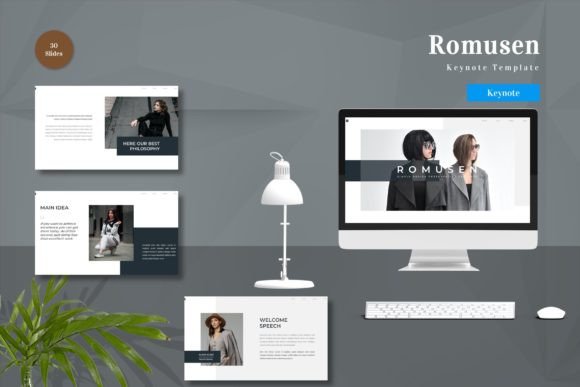
- Pre-made Variations: There are 30 useful slide layouts categorized for specific purposes, such as introductions, team profiles, data analysis, and conclusions.
- Color Flexibility: The template comes with five pre-made color schemes. These are not just cosmetic changes but are integrated into the master slides, allowing for quick global updates.
- Vector-Based Design: All graphical elements are vector-based. This means they can be scaled up or down without losing resolution, ensuring crisp visuals on both small laptop screens and large projection displays.
- Master Slide Integration: The template is built on Keynote’s Master Slides feature. This architectural choice simplifies the editing process, as changes made to the master layout automatically propagate to all associated slides.
- Typography: It utilizes recommended free web fonts, reducing compatibility issues and ensuring that the presentation looks consistent even if shared with others who may not have specialized font libraries installed.
Additionally, the inclusion of animated slides adds a dynamic layer to presentations. These animations are pre-configured but remain editable, allowing users to tone them down for formal settings or enhance them for more creative pitches.
Usability and Workflow Efficiency
The primary value proposition of the Romusen - Keynote Template lies in its "drag and drop" functionality. For individuals who are not professional graphic designers, the learning curve associated with creating visually appealing slides can be steep. This template mitigates that barrier by providing ready-to-use containers for content.
The workflow is straightforward: users select a slide layout that matches their content type, drag their images into the placeholders, and type their text. Because the template is fully editable, there is no risk of being locked into a design that does not fit the narrative. The readme file included in the package provides necessary guidance, ensuring that even first-time users can navigate the file structure effectively.
It is important to note that preview images are not included in the final download, which is a standard practice for digital templates to protect intellectual property. However, the five included Keynote files correspond to the five pre-made colors, allowing users to immediately see how the design translates across different palettes.
Ideal Use Cases
The Romusen - Keynote Template is particularly well-suited for specific audiences and scenarios. Understanding where it fits best can help potential users make an informed decision.
Corporate Business Presentations
For business professionals, consistency and clarity are paramount. The clean lines and structured layouts of this template support the clear communication of data and strategy. The ability to quickly switch between five color themes makes it ideal for agencies or consultants who work with multiple clients and need to adapt their deck’s appearance to match different brand identities rapidly.
Startup Pitches and Investor Decks
Startups often need to convey innovation and professionalism simultaneously. The animated slides included in the template can help highlight key value propositions without appearing overly flashy. The vector-based icons and charts allow for the clear visualization of growth metrics and market data, which are critical components of investor pitches.
Educational and Personal Projects
Beyond the corporate world, the template serves educators and individuals creating portfolios or personal project summaries. The 150 slides provide enough variety to keep an audience engaged during longer lectures or detailed walkthroughs. The ease of editing means that teachers can quickly update content semester after semester without redesigning the entire deck.
Considerations and Potential Tradeoffs
While the Romusen - Keynote Template offers significant advantages, it is not without limitations. Prospective users should consider the following factors:
Platform Dependency: This template is exclusively designed for Keynote. Users who rely on Microsoft PowerPoint or Google Slides will not be able to use this product directly. While Keynote files can sometimes be exported to other formats, the advanced animations and specific layout structures may not translate perfectly, potentially requiring manual rework.
Design Uniformity: Because this is a pre-made template, there is a possibility that other users may have similar-looking presentations. While the editable nature allows for customization, achieving a completely unique look requires additional design effort beyond simple drag-and-drop actions.
Learning Curve for Master Slides: Although the template is user-friendly, fully leveraging the Master Slides feature requires a basic understanding of how Keynote handles hierarchical design elements. Users who attempt to edit individual slides without understanding the master structure may find themselves frustrated when changes do not apply globally as expected.
Making the Decision
Choosing the right presentation tool depends on your specific goals, technical environment, and design skills. If you are already embedded in the Apple ecosystem and use Keynote regularly, the Romusen - Keynote Template represents a strong investment in efficiency. It removes the tedious aspects of slide design, allowing you to focus on the substance of your message.
However, if your workflow requires frequent collaboration with non-Apple users, or if you need absolute uniqueness in your design language, you may need to weigh the convenience of this template against the potential need for further customization or format conversion. For those seeking a balanced, professional, and editable starting point for their next presentation, this template provides a robust framework that supports both business rigor and creative expression.
Ultimately, the value of the Romusen - Keynote Template lies in its ability to bridge the gap between professional design standards and user accessibility. By providing a comprehensive set of editable, vector-based, and animated slides, it empowers users to create compelling narratives with minimal technical friction.