Modiac Keynote Template: Streamline Your Presentations
In the fast-paced world of business and creative communication, the visual impact of your presentation can be just as critical as the data you present. Whether you are pitching to investors, teaching a university course, or sharing quarterly results with your team, the design framework you choose sets the tone for your entire message. This is where Modiac - Keynote Template enters the conversation as a robust solution for professionals who need efficiency without sacrificing aesthetic quality.
Designed for versatility, this template addresses a common pain point for many presenters: starting from scratch. Instead of wrestling with alignment issues, font pairings, and color theory every time you open a new file, Modiac provides a polished foundation. It allows you to focus entirely on your narrative while ensuring that every slide looks cohesive and professional.
Why Design Consistency Matters
Consistency builds trust. When your slides jump between different fonts, erratic spacing, and clashing colors, your audience subconsciously questions the reliability of your content. A unified design language signals preparation and attention to detail. The Modiac - Keynote Template leverages master slides and vector-based elements to ensure that every component remains crisp and aligned, regardless of how much you customize it.
For entrepreneurs and marketers, branding is non-negotiable. This template supports five premade color schemes, offering a solid starting point that can be easily adapted to match corporate identity guidelines. Because the elements are fully editable, you are not locked into a rigid structure. You can input your content, replace placeholder images with your own high-resolution assets, and adjust colors to fit your specific brand palette in minutes.
Key Features That Enhance Workflow
The value of any presentation tool lies in its usability. Modiac is built with the user experience in mind, focusing on drag-and-drop functionality that simplifies the creation process. Here is a breakdown of what makes this template stand out:
- Extensive Slide Library: With 150 total slides, the template covers a vast array of scenarios. From title slides and agenda overviews to complex data visualization layouts, there is likely a pre-designed slide that fits your needs.
- Versatile Color Options: The inclusion of five premade colors means you can switch the entire mood of the presentation with a few clicks. This is particularly useful for agencies managing multiple clients with distinct brand identities.
- Vector-Based Graphics: Unlike raster images that pixelate when resized, vector elements remain sharp at any scale. This ensures your icons and shapes look professional on both small laptop screens and large conference room projectors.
- Animated Slides: Static presentations can feel dry. Modiac includes animated slides that add a layer of dynamism to your delivery, helping to maintain audience engagement without being distracting.
- Free Web Fonts: The template recommends free web fonts, eliminating licensing headaches and ensuring that your text renders correctly across different devices if you share the file digitally.
Practical Applications Across Industries
The flexibility of Modiac - Keynote Template makes it suitable for a wide range of users. Let’s explore how different professionals can leverage this tool.
Corporate Professionals and Entrepreneurs
For business leaders, time is a scarce resource. The 30 useful slide types included in the core set allow for rapid assembly of pitch decks, annual reports, and strategy meetings. The master slide functionality ensures that if you need to update a logo or change a footer across 100 slides, you can do it globally rather than manually editing each page. This efficiency translates directly into productivity gains.
Educators and Trainers
Teachers and corporate trainers often need to present complex information clearly. The clean layout and structured hierarchy of Modiac help break down dense topics into digestible segments. The ability to easily swap images and modify diagrams makes it ideal for creating customized lesson plans or training modules that resonate with specific student groups.
Creative Freelancers and Bloggers
Creatives often use presentations as portfolios or media kits. The aesthetic appeal of Modiac allows photographers, designers, and writers to showcase their work in a context that feels curated and high-end. The widescreen format is optimized for modern displays, ensuring that visual portfolios look immersive and impactful.
Maximizing the Template’s Potential
To get the most out of Modiac - Keynote Template, start by reading the included readme file. While the interface is intuitive, understanding the structure of the master slides will save you time in the long run. Since the template is based on master slides, making changes at the master level propagates them throughout the document, maintaining consistency effortlessly.
When replacing placeholder images, aim for high-quality visuals that complement the text rather than compete with it. The vector-based nature of the template means you can recolor icons to match your specific accent colors, creating a truly bespoke look. Additionally, take advantage of the animated slides sparingly. Use motion to highlight key data points or transition between major sections, but avoid over-animating, which can detract from your message.
Technical Considerations and Usability
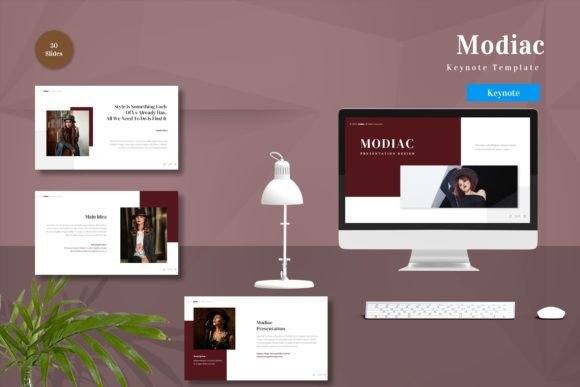
One notable aspect of this package is its comprehensive nature. It includes five separate Keynote files, each corresponding to one of the premade color schemes. This organization allows you to choose the base that closest matches your needs before you begin editing. However, it is important to note that preview images are not included in the download, so referring to the product listing for visual examples before purchasing is advisable.
The requirement for Keynote software is standard, but the use of recommended free web fonts ensures compatibility and ease of sharing. If you are collaborating with a team, ensure everyone has access to the same font libraries to prevent formatting shifts. The drag-and-drop editing capability reduces the learning curve, making it accessible even for those who are not graphic design experts.
Final Thoughts on Presentation Efficiency
In an era where attention spans are shortening, the clarity and professionalism of your visual aids can determine the success of your communication. Modiac - Keynote Template offers a balanced blend of aesthetic sophistication and functional practicality. By providing a wide variety of editable elements, animated options, and consistent design structures, it empowers users to create compelling narratives without getting bogged down in technical design details.
Whether you are preparing for a high-stakes board meeting or a casual community workshop, having a reliable template like Modiac in your toolkit can significantly reduce preparation stress. It allows you to channel your energy into refining your message and connecting with your audience, confident that your visual presentation supports your goals with precision and style. For anyone looking to elevate their presentation game with minimal friction, this template represents a smart, efficient investment in your professional toolkit.