Autumn Leaf Editable Text Effect: A Practical Resource for Seasonal Design
Seasonal design trends often dictate the visual language of marketing campaigns, social media feeds, and editorial layouts. Among these, autumn aesthetics hold a unique position, evoking warmth, nostalgia, and comfort. For designers and content creators, capturing this mood efficiently is crucial. The Autumn Leaf editable text effect emerges as a specialized asset designed to streamline this process. Rather than building complex layer styles from scratch, this resource provides a pre-configured solution for Adobe Illustrator, allowing users to apply sophisticated typographic treatments with minimal effort.
This article examines the utility, technical specifications, and practical applications of this text effect. It is intended for professionals, marketers, and small business owners who need to maintain high visual standards while managing tight deadlines. By understanding the capabilities and limitations of such assets, you can determine whether this tool aligns with your current workflow and project requirements.
Understanding the Asset and Its Core Functionality
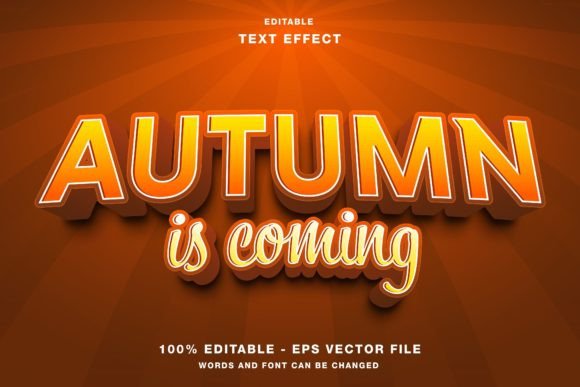
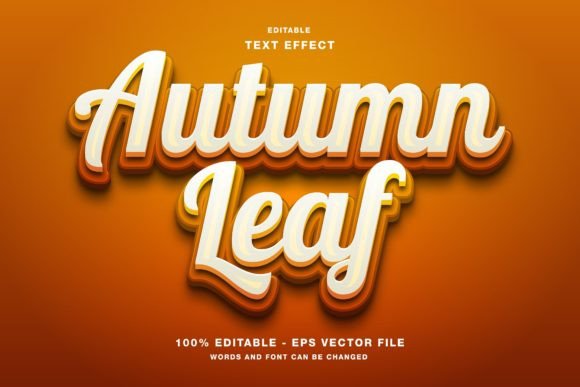
At its core, the Autumn Leaf editable text effect is a vector-based graphic resource. Unlike raster-based effects that may lose quality when scaled, this asset utilizes the power of Adobe Illustrator’s vector engine. The primary function is to transform standard typography into stylized text that mimics the organic shapes, colors, and textures of falling leaves. This is achieved through a combination of clipping masks, gradient meshes, and layered vector shapes that are pre-arranged for easy manipulation.
The term "editable" is central to its value proposition. Many stock graphics are static images, requiring significant work to integrate into new designs. In contrast, this effect allows you to replace the placeholder text with your own copy while retaining the intricate leaf details. Whether you are designing a headline for a Instagram post or a title for a magazine feature, the underlying structure adapts to the length and shape of your new text. This flexibility ensures that the design remains cohesive regardless of the specific message being conveyed.
Technical Specifications and File Compatibility
For any digital asset to be useful in a professional environment, it must meet certain technical standards. The Autumn Leaf editable text effect is delivered in EPS format, which is widely compatible with various versions of Adobe Illustrator and other vector editing software. Additionally, JPG files are included in the main folder, providing quick previews and options for non-vector workflows if necessary.
A critical specification to note is the color mode. This text effect is designed in RGB color mode. This choice is intentional and highly relevant for modern digital marketing. RGB (Red, Green, Blue) is the standard color model for screens, including smartphones, tablets, computer monitors, and digital signage. If your primary output channels are web designs, social media promotions on platforms like Twitter, Facebook, or Instagram, or digital newsletters, RGB ensures that the vibrant autumn hues—rich oranges, deep reds, and golden yellows—appear exactly as intended on screen.
However, designers should be aware of the implications for print. While the effect can be converted to CMYK for physical materials like flyers, posters, or magazines, some color shifting may occur. The neon-bright vibrancy of RGB often dulls slightly when translated to ink. Therefore, if you plan to use this asset for large-scale event papers or high-end publication promotion, it is advisable to test print proofs early in the design process to adjust saturation levels accordingly.
Practical Applications in Marketing and Media
The versatility of the Autumn Leaf editable text effect makes it suitable for a wide range of promotional materials. Its aesthetic is particularly effective for industries that rely on seasonal engagement, such as retail, hospitality, education, and lifestyle blogging.
- Social Media Promotions: On visually driven platforms like Instagram and Pinterest, eye-catching typography can significantly increase engagement rates. This effect allows brands to create consistent seasonal branding without hiring a dedicated illustrator for every post.
- Digital Advertising: For web banners and email headers, the lightweight nature of vector-based text ensures fast loading times while maintaining sharpness on high-resolution displays.
- Event Promotion: Fall festivals, harvest markets, and academic events can utilize this text style for flyers and digital invitations. The organic feel of the leaves adds a welcoming and community-oriented tone to the messaging.
- Editorial Design: Bloggers and online publishers can use this effect for article headlines or section breaks, adding visual interest to long-form content and improving readability through stylistic variation.
By integrating this effect into your toolkit, you reduce the time spent on repetitive design tasks. Instead of experimenting with brush tools and opacity masks, you can focus on layout, hierarchy, and message clarity. This efficiency is particularly valuable for freelancers and small business owners who often wear multiple hats and must balance creative output with administrative responsibilities.
Ease of Use and Customization Potential
One of the strongest attributes of this resource is its user-friendly structure. The creator has organized the layers logically, ensuring that even users with intermediate Illustrator skills can navigate the file with ease. To edit the text, you typically only need to select the text object, type your desired phrase, and adjust the font size if necessary. The surrounding leaf elements automatically adjust or can be manually tweaked if the new text length requires minor compositional changes.
Beyond simple text replacement, the asset offers considerable customization potential. Since all elements are vector shapes, you can modify individual leaf colors to match specific brand guidelines. If your brand palette leans more towards burgundy and gold rather than orange and brown, you can use the Recolor Artwork feature in Illustrator to shift the entire spectrum instantly. This level of control ensures that the Autumn Leaf editable text effect does not look like a generic template but rather a bespoke element tailored to your identity.
Furthermore, the scalability of vector graphics means you can use the same file for a small Twitter header and a large outdoor poster without any loss in quality. This consistency across different mediums strengthens brand recognition and reduces the need for creating multiple versions of the same design.
Who Benefits Most from This Resource?
While any designer can appreciate a well-made asset, certain groups will find the Autumn Leaf editable text effect particularly beneficial. Freelance graphic designers working with multiple clients during the fall season can use this to speed up delivery times. Social media managers who need to produce daily content can rely on this effect to maintain a seasonal theme without starting from zero each time.
Educators and school administrators may also find value in this tool for creating engaging materials for autumn-themed events, newsletters, or classroom decorations. Small business owners in the food and beverage industry, such as coffee shops and bakeries, can use it for menu updates and promotional signs that resonate with the cozy atmosphere of the season.
However, it is important to recognize the limitations. This effect is best suited for short headlines or titles. Long paragraphs of text will not render effectively with such intricate graphical overlays, as readability would be compromised. Therefore, it should be used strategically for emphasis rather than for body copy.
Final Considerations for Integration
Incorporating the Autumn Leaf editable text effect into your workflow represents a strategic investment in efficiency and visual quality. It bridges the gap between custom illustration and stock photography, offering a middle ground that is both distinctive and practical. By understanding its RGB orientation, vector flexibility, and ease of customization, you can leverage this tool to enhance your seasonal campaigns effectively.
As with any design resource, the key to success lies in thoughtful application. Use it to complement your existing brand elements, ensure legibility, and adapt the colors to fit your specific narrative. When used correctly, this text effect can elevate your autumn communications, making them more engaging and professionally polished.