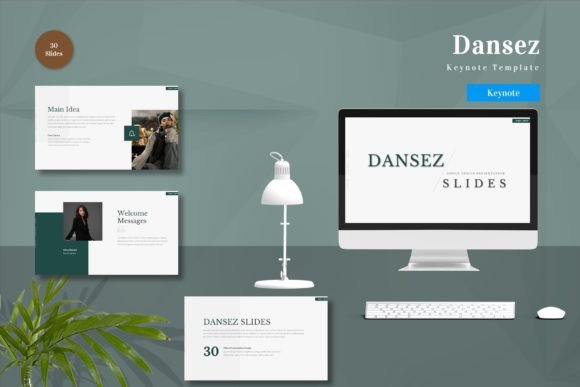
Dansez - Keynote Template: A Practical Tool for Polished Presentations
We have all been there. You have a brilliant idea, a solid business plan, or an engaging story to tell, but the moment you open your presentation software, the clock starts ticking. Designing slides from scratch is rarely just about typing text; it is about alignment, color theory, font pairing, and visual hierarchy. For many professionals, this design phase becomes a bottleneck that delays the actual work of communicating. This is where a resource like Dansez - Keynote Template steps in, not as a magic wand, but as a structured foundation that lets you focus on your message rather than your margins.
Dansez is not merely a collection of pretty pictures. It is a comprehensive system built for Apple’s Keynote application, designed to streamline the creation process for anyone who needs to present information clearly and professionally. Whether you are a freelancer pitching to a new client, an educator preparing lecture materials, or a small business owner updating your team, the value lies in efficiency and consistency. With 150 total slides spread across five premade color schemes, it offers enough variety to keep things fresh without overwhelming you with endless, redundant options.
Why Structure Matters More Than Decoration
When we talk about presentation templates, the conversation often drifts toward aesthetics. While looking good is important, functionality is what keeps an audience engaged. The Dansez - Keynote Template is vector-based and master slide-driven, which might sound technical, but it translates to a very practical benefit: scalability and ease of editing. Because the elements are vector-based, you can resize icons, charts, and shapes without losing quality. This is crucial when you are projecting onto a large screen in a conference room or sharing high-resolution PDFs with stakeholders.
The inclusion of 30 useful slide types means you are not forced to cram complex data into a bullet-point list. You have dedicated layouts for timelines, comparison charts, team introductions, and data visualization. This variety allows you to match the visual format to the type of information you are conveying. For instance, if you are explaining a project roadmap, a timeline slide provides immediate context that a paragraph of text simply cannot. By using the right layout for the right data, you reduce cognitive load for your audience, making your points easier to digest and remember.
Real-World Applications for Diverse Users
The versatility of Dansez makes it suitable for a wide range of scenarios. Let us look at how different users might leverage this tool in their daily workflows.
- Entrepreneurs and Startups: When seeking investment, clarity is currency. Investors see hundreds of decks. A clean, professional look signals competence. With Dansez, you can quickly assemble a pitch deck that highlights your problem-solution fit, market size, and financial projections using pre-built chart slides. The five premade colors allow you to align the deck with your brand identity without hiring a designer.
- Educators and Trainers: Teaching requires breaking down complex concepts. The animated slides included in the template can help reveal information step-by-step, preventing students from reading ahead and losing focus on your verbal explanation. You can replace placeholder images with diagrams or photos relevant to your lesson, ensuring the visual aids support your learning objectives.
- Marketers and Content Creators: Whether you are presenting a quarterly review or a social media strategy, visual consistency builds trust. The drag-and-drop functionality means you can swap out stock placeholders with your own campaign assets in seconds. This speed is invaluable when deadlines are tight and revisions are frequent.
- Freelancers and Consultants: Your proposal is often your first impression. A sloppy slide deck can undermine your expertise. Using a polished template like Dansez shows that you pay attention to detail. You can customize the colors to match your personal brand or your client’s corporate palette, demonstrating flexibility and professionalism.
Navigating the Features for Maximum Impact
One of the standout features of Dansez - Keynote Template is its approach to customization. It comes with five premade colors, but because it is fully editable, you are not locked into these choices. If your brand uses a specific shade of teal or orange, you can adjust the master slides to reflect that. This saves hours of manual recoloring. The recommendation to use free web fonts is also a thoughtful touch. It ensures that if you share your file with a colleague or client who does not have expensive proprietary fonts installed, the presentation will still look exactly as you intended. No more broken layouts or substituted fonts ruining your design.
The "Readme First" file included in the download is not just bureaucratic paperwork; it is a quick-start guide. Taking two minutes to read it can save you twenty minutes of frustration later. It explains how the master slides work, how to toggle animations, and how to best utilize the drag-and-drop elements. For users who are new to Keynote, this guidance bridges the gap between having a tool and knowing how to wield it effectively.
Considerations Before You Download
While Dansez is a powerful tool, it is essential to approach it with realistic expectations. First, note that preview images are not included in the final download. This is standard for digital templates to protect intellectual property, but it means you need to rely on the product description and previews provided on the sales page to gauge the style. Make sure the aesthetic aligns with your needs before purchasing.
Second, remember that a template is a starting point, not a finished product. The 150 slides are placeholders. They require your content, your images, and your narrative. The most common mistake users make is dumping too much text onto these beautifully designed slides. Resist the urge. Use the space wisely. Let the visuals breathe. The animated slides should be used sparingly to emphasize key points, not to distract with constant motion.
Finally, consider your software environment. This is a Keynote template. If you are a die-hard PowerPoint user, you will need to convert the file, which can sometimes shift formatting. It is best used within the Apple ecosystem for the smoothest experience. Ensure you have the latest version of Keynote to take full advantage of the vector capabilities and animation features.
Making the Choice to Streamline Your Workflow
In a world where time is our most scarce resource, tools that reduce friction are invaluable. Get it now Dansez - Keynote Template for All Business and Personal Needs is an investment in your efficiency. It removes the blank canvas anxiety and provides a structured path to a professional result. Whether you are creating a annual report, a wedding slideshow, a classroom lecture, or a startup pitch, the goal is the same: to communicate effectively.
By handling the heavy lifting of design, Dansez allows you to channel your energy into refining your message. It empowers non-designers to create visuals that compete with those made by professionals. So, if you find yourself dreading the design phase of your next presentation, consider giving this template a try. Input your content, replace the placeholders, adjust the colors, and let the structure do the rest. You might find that you not only save time but also enjoy the process of creating something that looks great and works well.